Airtable
This connector captures data from Airtable into Estuary collections.
Supported data resources
This connector captures data from accessible bases and tables in an Airtable account. All available tables will appear after connecting to Airtable.
Resources are named using the pattern {base_name}/{table_name}/{table_id}.
If you rename a base or table in Airtable, the connector treats the renamed resource as a new resource. The connector stops populating collections under the old name and begins populating new collections with the updated name.
Prerequisites
Authentication
Capturing data from Airtable requires an active Airtable account and an access token.
Setup
To create an access token, do the following:
- Log into your Airtable account.
- In the navigation bar, click on "Builder Hub".
- In the "Developers" section, click on "Personal access tokens".
- Click on "Create token".
- Give your token a name and add the following scopes:
data.records:readdata.recordComments:readschema.bases:read
- Under the "Access" section, choose the bases you want to capture data from.
- Click on "Create token".
- Copy the token for use in the connector configuration.
Configuration
You configure connectors either in the Estuary web app, or by directly editing the catalog specification file. See connectors to learn more about using connectors. The values and specification sample below provide configuration details specific to the Airtable source connector.
Properties
Endpoint
| Property | Title | Description | Type | Required/Default |
|---|---|---|---|---|
/credentials/access_token | Access Token | The Airtable access token. | string | Required |
/credentials/credentials_title | Authentication Method | Name of the credentials set. Set to Private App Credentials. | string | Required |
Bindings
| Property | Title | Description | Type | Required/Default |
|---|---|---|---|---|
/name | Data resource | Name of the data resource. | string | Required |
/interval | Interval | Interval between data syncs | string | |
/schedule | Formula Field Refresh Schedule | The schedule for refreshing this binding's formula fields. Accepts a cron expression. For example, a schedule of 55 23 * * * means the binding will refresh formula fields at 23:55 UTC every day. If left empty, the binding will not refresh formula fields. | string | 55 23 * * * |
Sample
captures:
  ${PREFIX}/${CAPTURE_NAME}:
    endpoint:
      connector:
        image: ghcr.io/estuary/source-airtable-native:v1
        config:
          credentials:
            credentials_title: Private App Credentials
            access_token: <secret>
    bindings:
      - resource:
          name: base_name/table_name/table_id
        target: ${PREFIX}/base_name/table_name/table_id
      {...}
Incremental Replication
Tables that include a lastModifiedTime field are replicated incrementally, meaning only new and updated records are captured after the initial sync. Tables without this field are replicated using full refreshes, where all records are fetched on every sync.
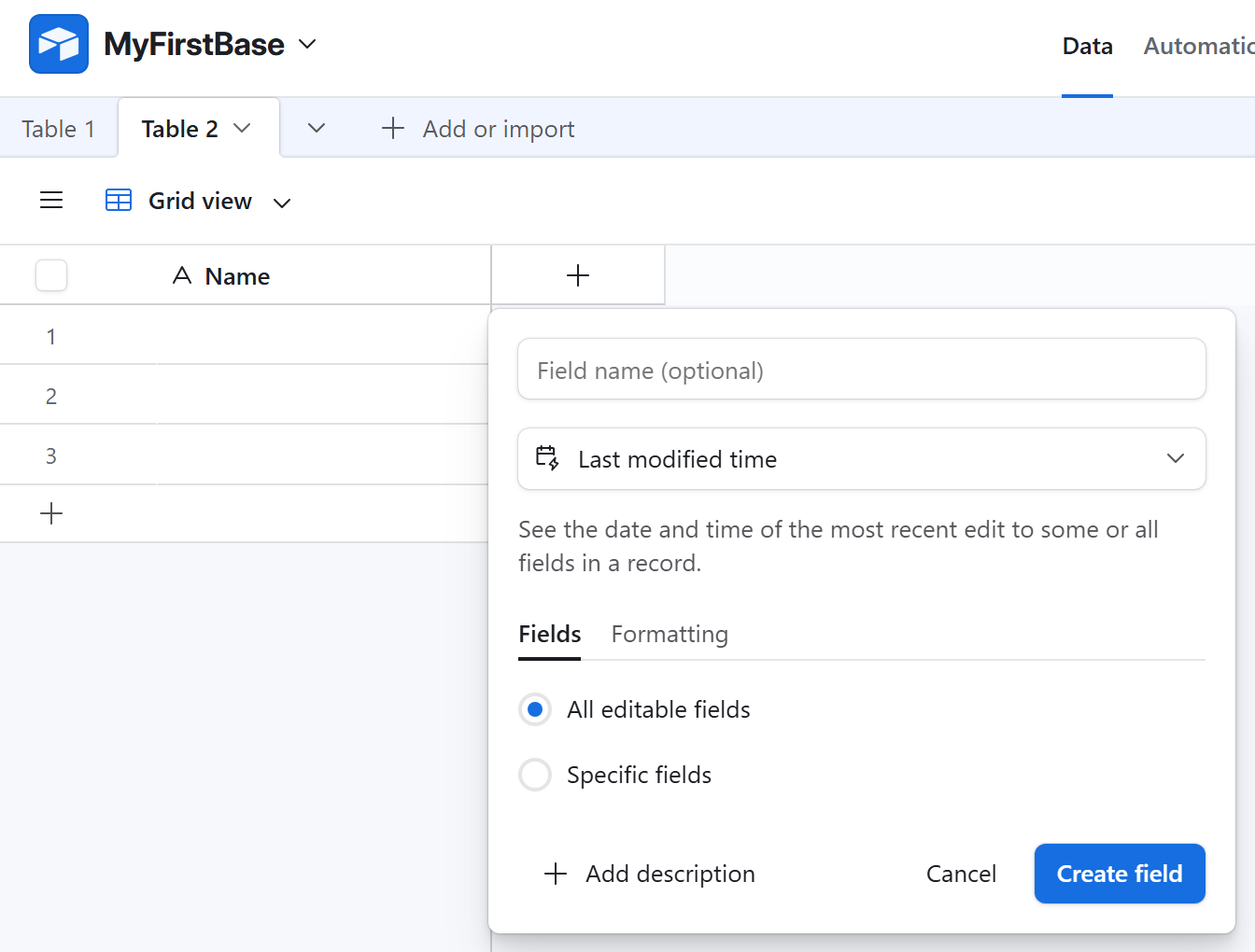
To enable incremental replication for a table, add a lastModifiedTime field:
- Click the + icon (Add field) in your table.
- Select Last modified time as the field type.
- Enter a name for the field.
- In the Fields section, select All editable fields.
- In the Formatting section, select Include time.
- Click Create field.
Formula Fields
Airtable tables can contain formula fields, fields whose values are calculated at query time. Formula field updates do not cause lastModifiedTime fields to change. Since the connector uses lastModifiedTime fields to incrementally detect changes, formula field updates are not incrementally captured.
To address this challenge, the Airtable connector is able to refresh the values of formula fields on a schedule after the initial backfill completes. This is controlled at a binding level by the cron expression in the schedule property. When a scheduled formula field refresh occurs, the connector fetches every record's current formula field values and merges them into the associated collection using merge reduction strategies.
Formula Field Errors
The connector omits formula fields containing error codes to avoid schema evolution that would widen column types in downstream materializations.