Azure BYOC Setup
If you want to use your own Azure tenant and subscription for an Estuary private deployment, you will first need to speak with your Estuary account manager. Estuary BYOC deployments require a license and additional setup on Estuary's side.
Once your account manager lets you know that the BYOC deployment can proceed, you will need to follow the steps below:
- Add the
data-plane-controllerAzure Application to your subscription by following this link: Add data-plane-controller
Your account will need Azure admin access to add the application to your Azure tenant.
If the application subscription process is successful, you will be redirected back to Estuary's homepage. You can confirm that the OAuth flow succeeded if there is a code query parameter attached to the URL (e.g. https://estuary.dev/?code=123).
If your Azure admin is signed into multiple tenants, the common endpoint defaults to whichever they're currently signed into, which may be the wrong one. To force a specific tenant, replace common in the data-plane-controller link with your tenant ID:
https://login.microsoftonline.com/{TENANT_ID}/oauth2/authorize?client_id=76f09062-041b-476e-9c79-1cf8d26fe213&response_type=code&redirect_uri=https%3A%2F%2Feyrcnmuzzyriypdajwdk.supabase.co%2Ffunctions%2Fv1%2Fazure-dpc-oauth
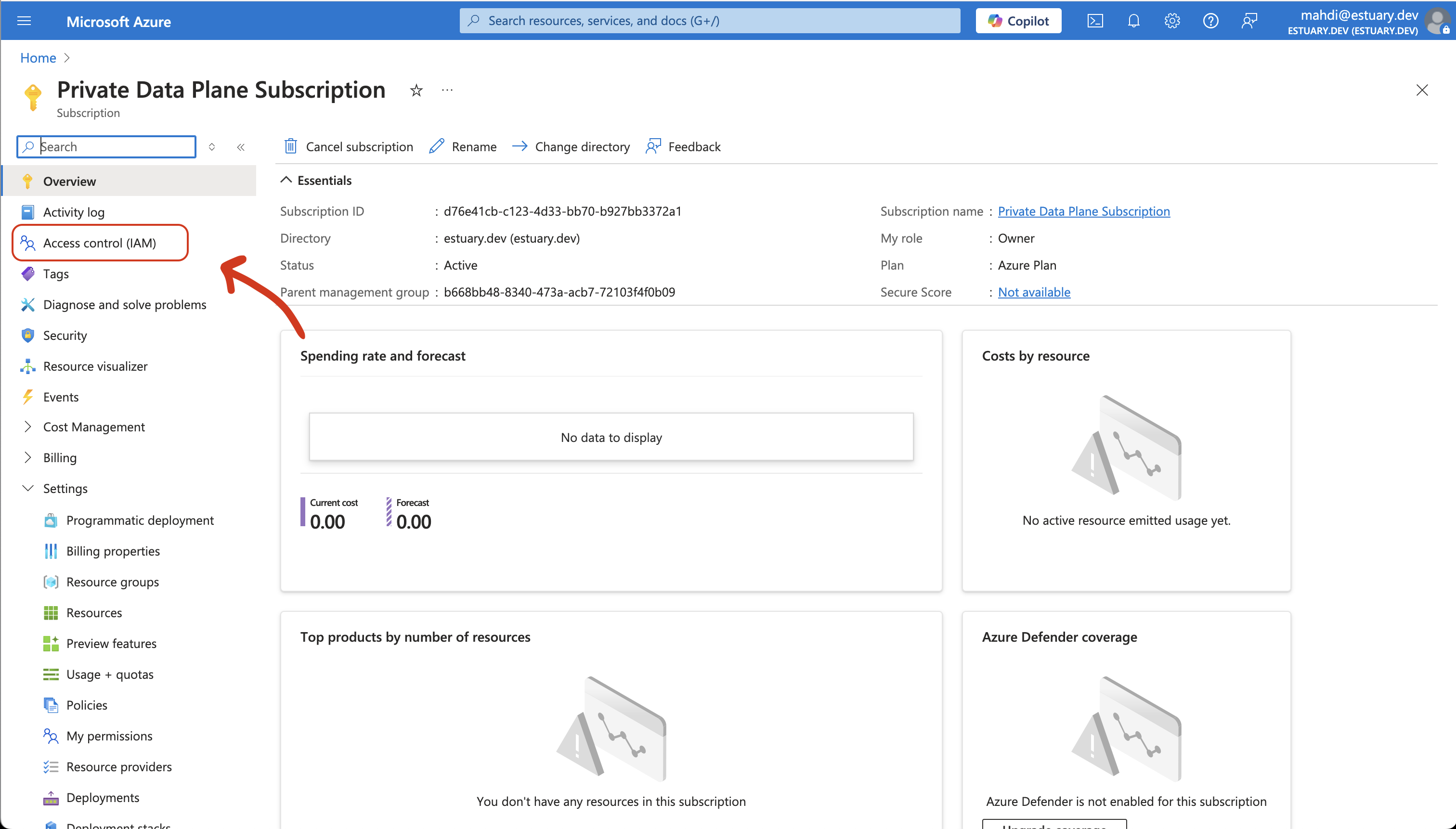
- In Azure Portal, search for "Subscriptions" and find your subscription, then click on "Access control (IAM)"
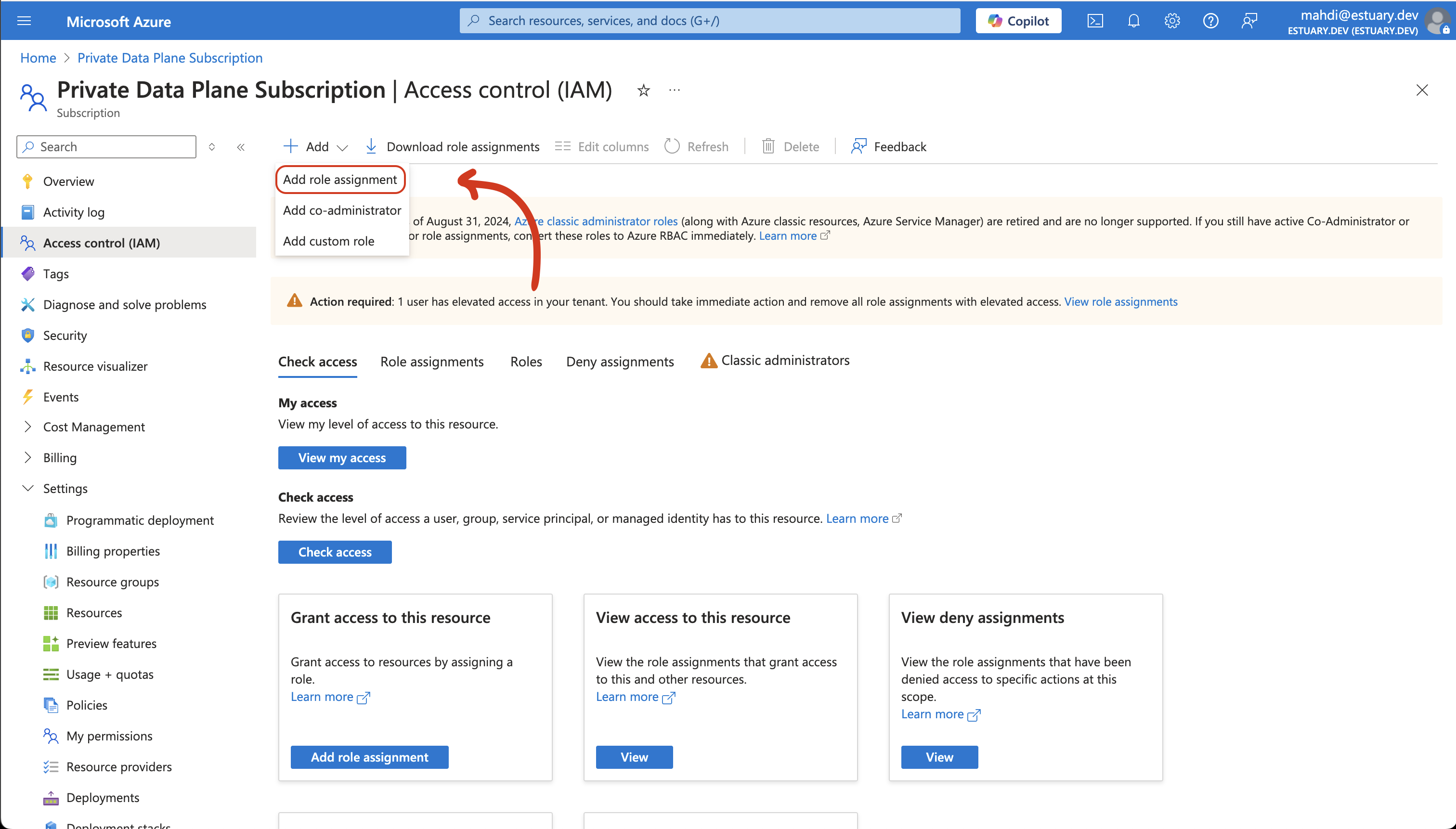
- Click "Add" and then "Add role assignment"
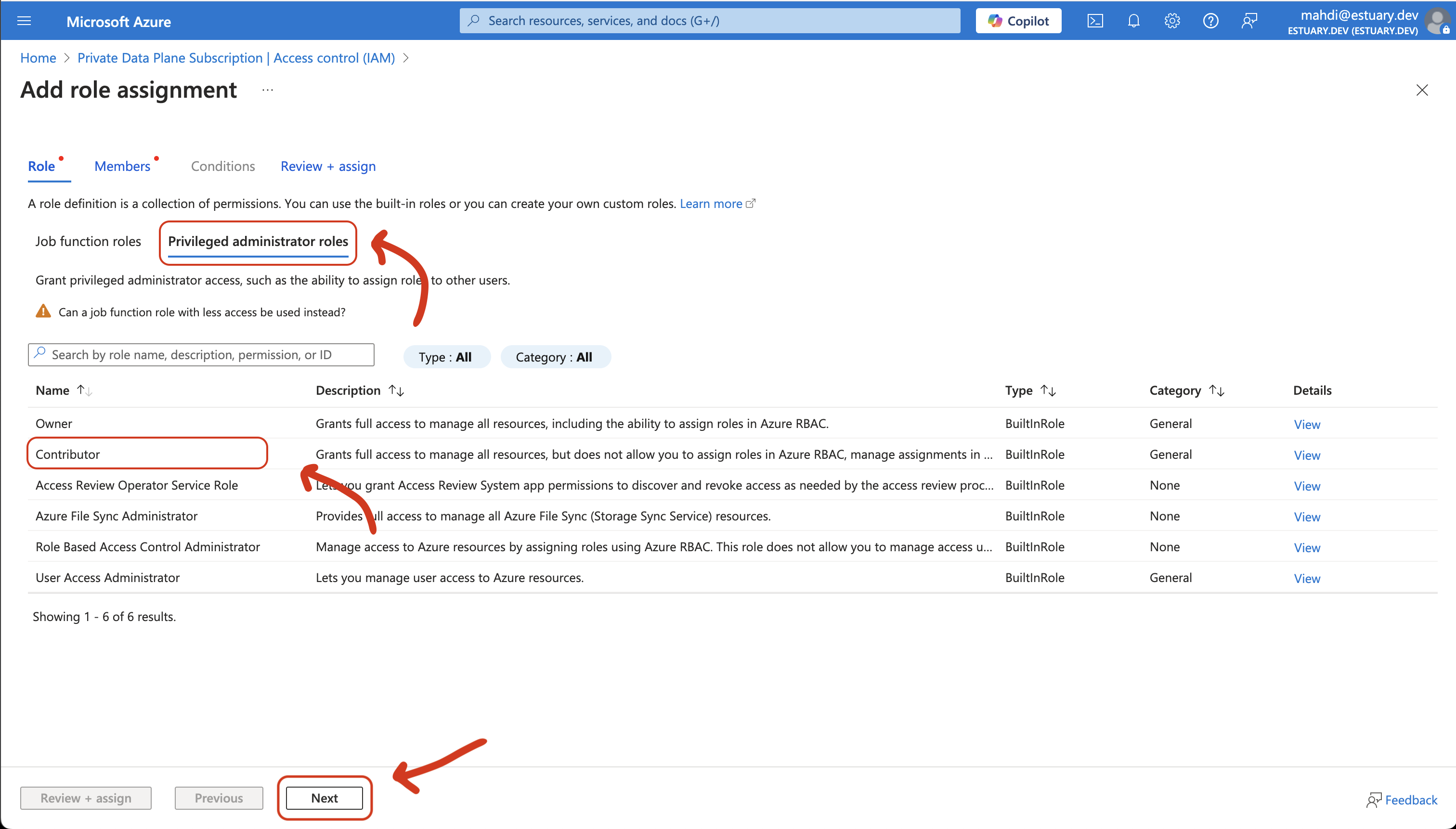
- Click "Privileged administrator roles", then "Contributor", then "Next"
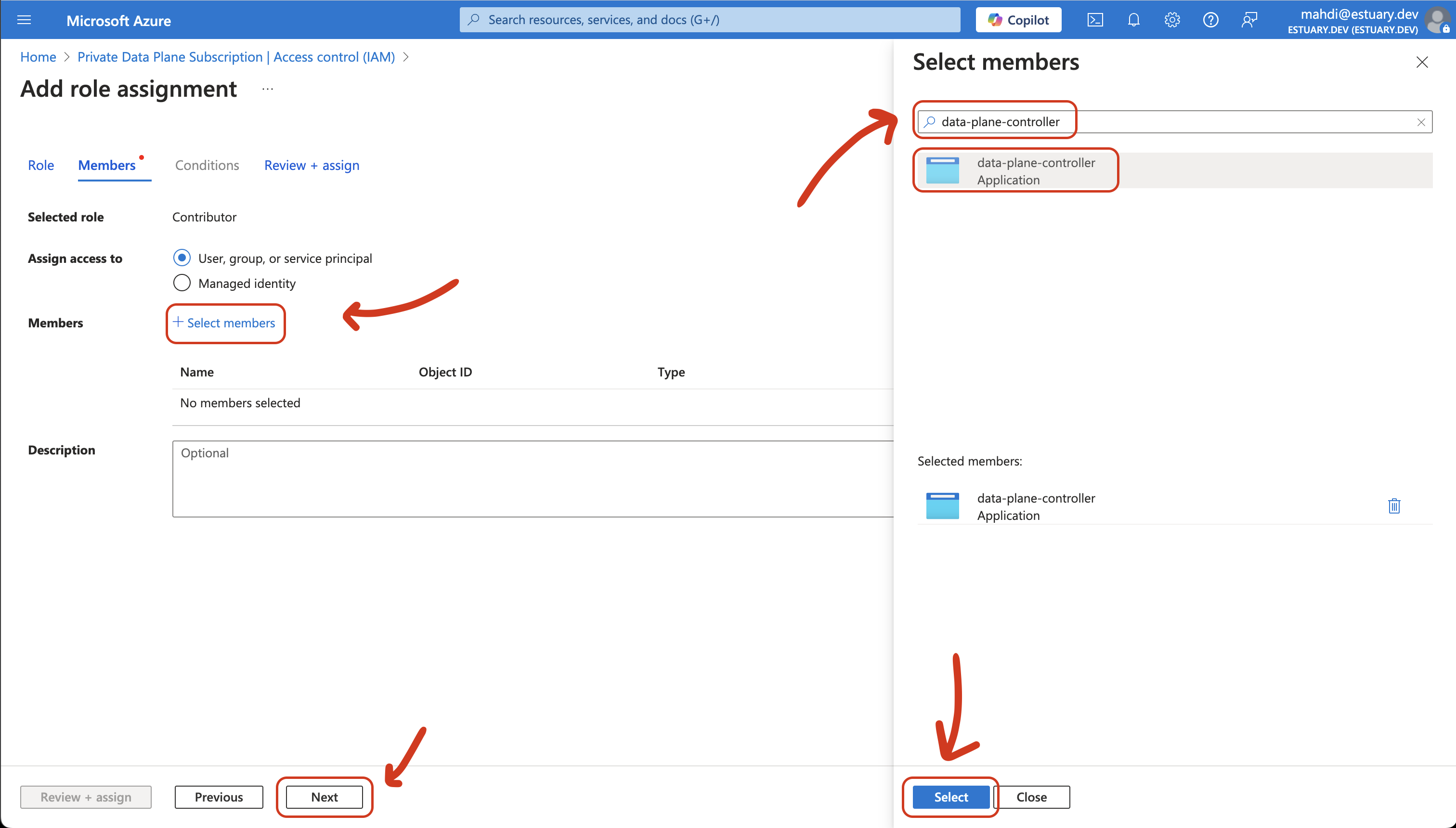
- Click "+ Select Members", search for "data-plane-controller" and "Select" it, then "Next"
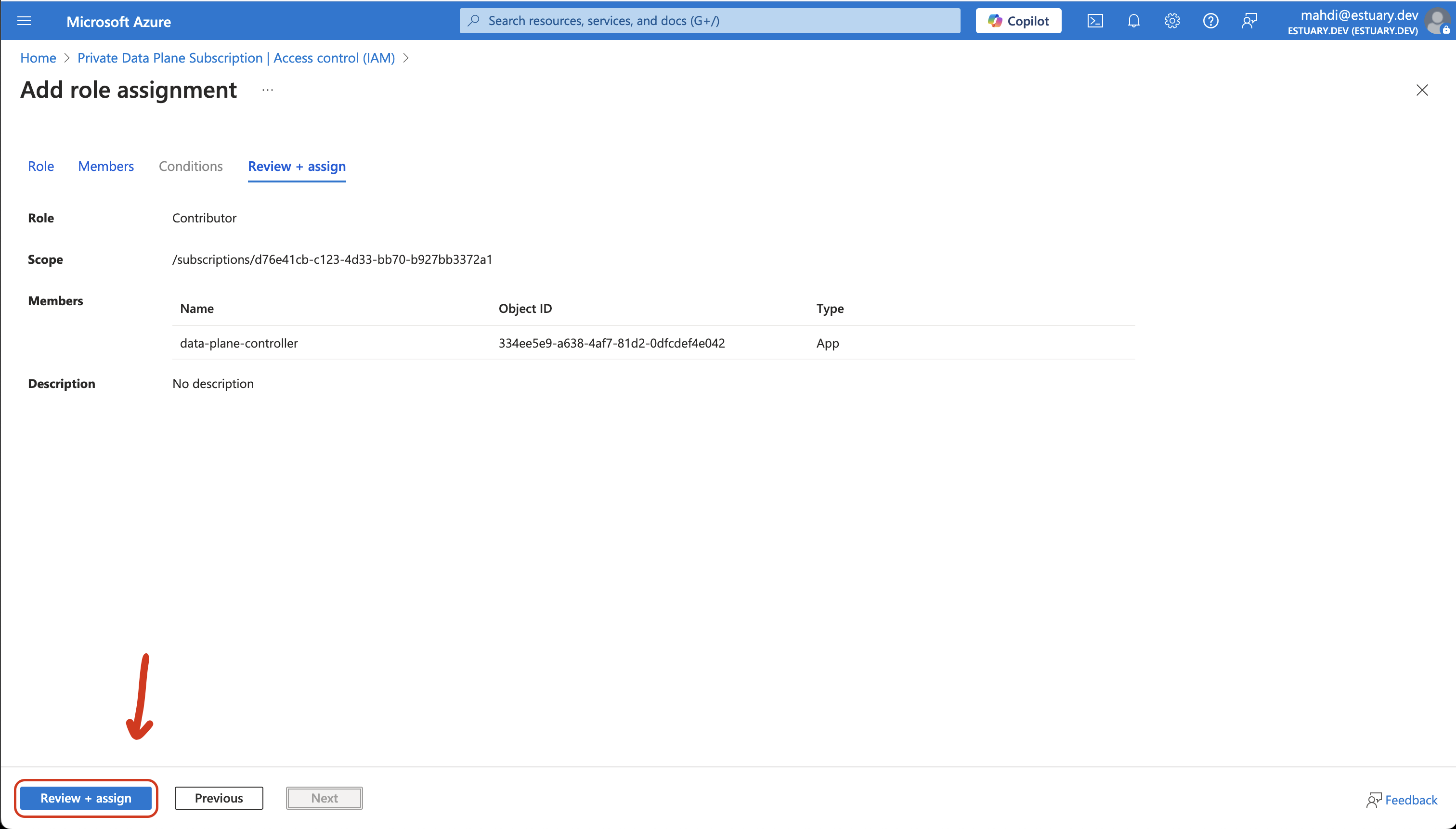
- Click "Review + Assign"
Finally, provide the following information to your Estuary point of contact:
- Subscription ID (found in Subscriptions -> Overview)
- Tenant ID (found in Tenant Properties)
- Azure region
Prepare your subscription for provisioning
After you have shared the details above, you may need to raise a few subscription limits so Estuary can provision the data plane. Depending on your subscription's existing limits, some of these may already be sufficient. You can do this in parallel with the steps above.
-
vCPU quota. New Azure subscriptions often start with a low or zero vCPU limit on many VM families, so you may need to raise quota in your target region before Estuary can provision. Estuary's default data plane uses the families below; request the following quota (in vCPUs) in your target region. The quotas are set at roughly twice steady-state so that rolling upgrades, which briefly run old and new VMs side by side, do not exhaust your limit:
Azure quota family vCPUs to request Standard DPSv6 Family 12 Default Standard EPSv6 Family 16 Default Standard EASv6 Family 8 Default Standard DSv5 Family 12 Fallback Standard ESv5 Family 24 Fallback The fallback families give Estuary an alternate VM generation to fall back on if the defaults are capacity-constrained, which improves the chance of a first-try deployment.
These quotas cover the etcd, gazette, and reactor VMs that every data plane runs. Some data planes also run an SSH bastion or Dekaf. If yours will, also request 4 vCPUs of Standard DPSv6 Family quota for the bastion and 4 vCPUs of Standard DASv6 Family quota for each Dekaf VM.
-
Public IP quota. Request a regional public IP quota of at least 40. A data plane uses roughly 18 public IP addresses at steady state, but rolling upgrades temporarily run old and new VMs side by side, so the count can nearly double during an upgrade.
-
Region choice. Some Azure regions (notably East US and East US 2) are more frequently capacity-constrained. To maximize the chance of a successful deployment, Estuary provisions your data plane regionally by default (drawing from the whole region's capacity pool) rather than pinning a specific availability zone, which has no durability impact. If you are flexible on region, you can also ask your Estuary contact which regions currently have the smoothest availability.
Estuary never changes your subscription settings without telling you. Quota increases are zero-cost ceiling changes; anything cost-bearing (such as a capacity reservation) is always your decision.