Backfilling Data
When new captures are created, you often have the option of backfilling data. This captures data in its current state and then switches to capturing change events on an ongoing basis.
This is desirable in most cases, as it ensures that a complete view of your data is captured into Estuary.
You also have options to backfill data in either the source, destination, or entire dataflow after initial connector setup. This can be useful to refresh data or recover in the event of data corruption.
Also see how schema evolution can help with backfills when a source's schema becomes incompatible with the existing schema.
Backfill types
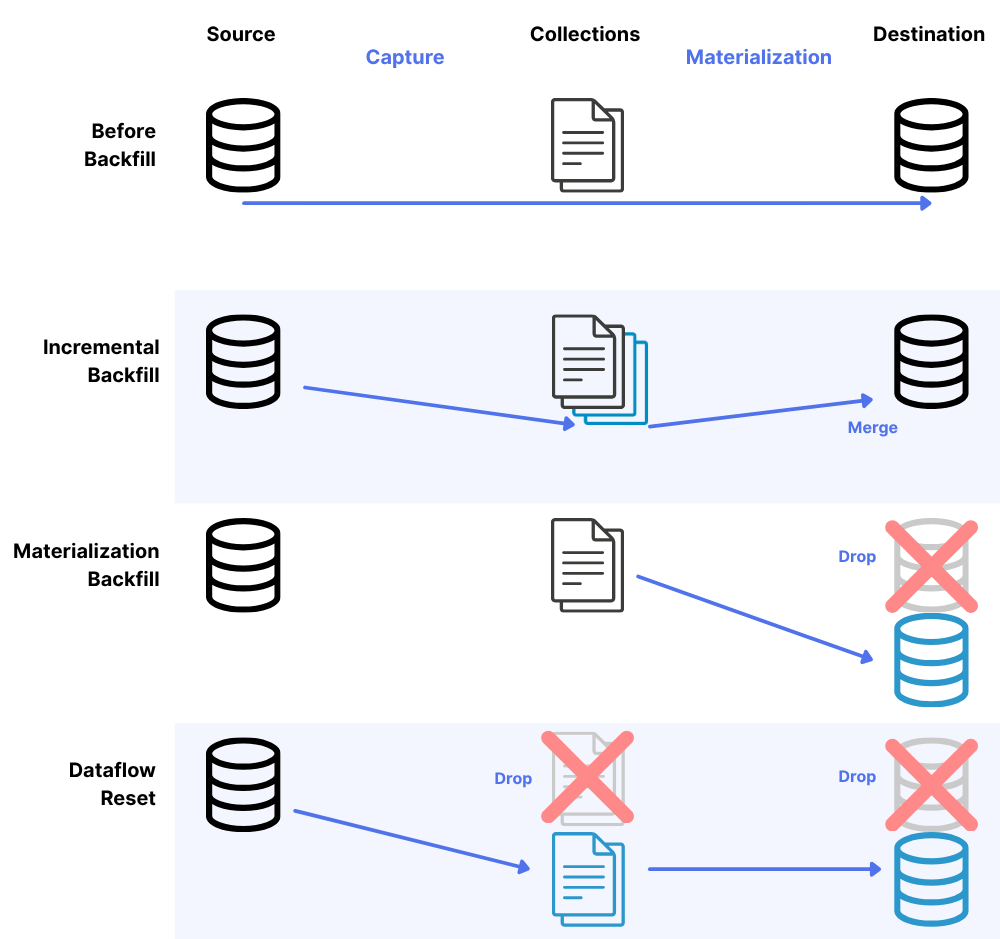
Incremental backfill
An incremental backfill on a capture refreshes data from your source system into Estuary collections without dropping your destination tables. This is useful when you need to update your collections with the latest source data or recover from data loss in your collections.
When you perform an incremental backfill:
- Data is reread from the source system
- The data is stored in Estuary collections
- Existing destination tables remain intact
- New or updated data will be materialized to destinations as part of the normal process
To perform an incremental backfill:
- Navigate to the Sources tab in Estuary's web UI
- Start editing your capture and click the Backfill button
- In the Backfill mode dropdown, select the Incremental backfill (advanced) option
- (Optional) Choose a specific Resource configuration backfill mode for the collection for advanced use cases
- Save and publish your changes
This option is ideal when you want to ensure your collections have the most up-to-date data without disrupting your destination systems.
When you perform an incremental backfill, all data is pulled into collections again, and materializations that use those collections will read and process this data. How the data is handled at the destination depends on your materialization settings:
- Standard (merge) updates: The system will query the destination for existing records with matching keys and merge the incoming data with existing records. This prevents duplication in your destination tables.
- Delta updates: New records are inserted without checking for existing data, which can result in duplicate records in your destination.
Materialization backfill
A materialization backfill drops and recreates your destination tables using the data currently stored in your Estuary collections. This is useful when you need to refresh destination tables without rereading from the source.
When you perform a materialization backfill:
- Destination tables are dropped and recreated
- Data is read from existing Estuary collections
- No new data is pulled from the source
- Tables are repopulated with data from collections
To perform a materialization backfill:
- Navigate to the Destinations tab in Estuary's web UI
- Find your materialization and start editing it
- Under the Source Collections section, expand Advanced options
- Select the Backfill button
- Save and publish your changes
Or you can select individual collections to backfill:
- Navigate to the Destinations tab in Estuary's web UI
- Find your materialization and start editing it
- Select a collection you would like to backfill
- In the collection's Resource configuration, expand the Advanced options section
- Select the Backfill button
- Repeat steps 3-5 for all collections you'd like to backfill
- Save and publish your changes
Dropping destination tables may create downtime for your destination table consumers while data is backfilled.
This option is best when you need to refresh destination tables but are confident your collections contain all the necessary historical data.
Dataflow reset
A dataflow reset is the most comprehensive option, refreshing the entire pipeline from source to destination. This option drops destination tables, rereads data from the source into collections, and then materializes that data to the destination.
When you perform a dataflow reset:
- Data is reread from the source system
- Inferred schemas are reset
- Destination tables are dropped and recreated
- Collections are replaced with fresh source data
- Derivations are dropped and recreated
- Destination tables are repopulated with the refreshed data
To perform a dataflow reset:
- Navigate to the Sources tab in Estuary's web UI
- Start editing your capture and click the Backfill button
- In the Backfill mode dropdown, select the Dataflow reset option
- (Optional) Choose a specific Resource configuration backfill mode for the collection for advanced use cases
- Save and publish your changes
This option is ideal when you need a complete refresh of your entire data pipeline, especially when you suspect data inconsistencies between source, collections, and destinations.
Backfill Selection
Backfills can be a powerful tool to recover data, but can also result in unnecessary data costs if used incorrectly. This section will help you choose when to backfill and which backfill option to use.
When deciding which backfill type to use, consider:
- Data retention: If using Estuary's trial buckets, data expires after approximately 20 days. For full historical data, configure your own storage bucket.
- Table size: For very large tables (TBs of data), consider the impact (time, data, cost) of dropping and recreating tables.
- Downtime tolerance: Materialization and dataflow resets involve dropping destination tables, which creates downtime.
- Update strategy: Consider whether your materializations use standard (merge) or delta updates, as this affects how backfilled data is handled at the destination. Using incremental backfills (not dropping the destination tables) when you have materializations that use delta updates may result in duplicate rows.
By understanding these backfill types, you can choose the appropriate method to maintain data consistency across your Estuary pipelines while minimizing disruption to your data consumers.
| If I want to... | Then I should... |
|---|---|
| Refresh my collections with source data, without dropping destination tables | Use an Incremental Backfill to pull all source data into Estuary collections |
| Rebuild destination tables using existing collection data | Use a Materialization Backfill to drop and recreate destination tables from collections |
| Completely refresh my entire data pipeline from source to destination | Use a Dataflow Reset to drop destination tables and backfill from source |
| Recover from a replication slot failure in PostgreSQL | Use an Incremental Backfill to re-establish consistency |
| Add a new table to my existing data flow | Use an Incremental Backfill for just the new binding |
| Ensure my own storage bucket contains complete historical data | Use an Incremental Backfill after setting up the new storage mapping |
| Recreate a destination table from scratch when using trial buckets with limited retention | Use a Dataflow Reset to ensure all historical source data is included |
| Update my destination with schema changes from the source | Use a Dataflow Reset to ensure schema changes are properly propagated |
| Recover from data corruption in both collections and destinations | Use a Dataflow Reset for a complete refresh of the entire pipeline |
| Recover from data corruption in both collections and destinations for very large (TBs of data) datasets | Use a Dataflow Reset for a refresh of the pipeline with capture configurations to start the backfill from a particular timestamp or transaction id |
Preventing backfills
Preventing backfills when possible can help save costs and computational resources. You may find it appropriate to skip the backfill, especially for extremely large datasets or tables.
In this case, many connectors allow you to turn off backfilling on a per-stream or per-table basis. See each individual connector's properties for details.
Preventing backfills during database upgrades
During an upgrade, some databases invalidate a replication slot, binlog position, CDC tables, or similar. As Estuary relies on these methods to keep its place, upgrades will disrupt the Estuary pipeline in these cases.
- If a database upgrade will not affect these resources, the Estuary connector should simply resume when the upgrade completes and no action is required.
- If a database upgrade will affect these or similar resources, you may need to trigger a backfill after the upgrade completes.
The easiest and most bulletproof solution when this happens is to backfill all bindings of the impacted capture(s) after performing the upgrade. This will permit the captures to recreate entities as necessary, establish a new CDC position, and then backfill all table contents to ensure that any changes which might have occurred in the meantime are correctly captured.
However, it is common to want to avoid a full backfill when performing this sort of database maintenance, as these backfills may take some time and require a significant amount of extra data movement even if nothing has actually changed. Some connectors provide features which may be used to accomplish this, however they typically require some amount of extra setup or user knowledge to guarantee certain invariants (put simply: if there were a more efficient way to re-establish consistency in the general case, that's what we would already be doing when asked to backfill the data again).
For example, Postgres currently deletes or requires users to drop logical replication slots during a major version upgrade. To prevent a full backfill during the upgrade, follow these steps:
-
Pause database writes so no further changes can occur.
-
Monitor the current capture to ensure captures are fully up-to-date.
- These two steps ensure the connector won't miss any changes.
-
Perform the database upgrade.
-
Backfill all bindings of the capture using the "Only Changes" backfill mode and make sure to select "Incremental Backfill (Advanced)" from the drop down.
- This will not cause a full backfill. "Backfilling" all bindings at once resets the WAL (Write-Ahead Log) position for the capture, essentially allowing it to "jump ahead" to the current end of the WAL. The "Only Changes" mode will skip re-reading existing table content. Incremental backfill will append new data to your current collection.
-
Resume database writes.
Resource configuration backfill modes for SQL CDC captures
Backfill modes apply only to SQL CDC connectors (PostgreSQL, MySQL, SQL Server, etc.). Non-SQL connectors and non-CDC connectors do not have this setting.
SQL CDC connectors allow fine-grained control of backfills for individual tables. These bindings include a "Backfill Mode" dropdown in their resource configuration. This setting then translates to a mode field for that resource in the specification. For example:
"bindings": [
    {
      "resource": {
        "namespace": "public",
        "stream": "tableName",
        "mode": "Only Changes"
      },
      "target": "Artificial-Industries/postgres/public/tableName"
    }
  ]
In general, you should not change this setting. Make sure you understand your use case, such as preventing backfills.
Available modes
-
Normal: backfills chunks of the table and emits all replication events regardless of whether they occur within the backfilled portion of the table or not.
In Normal mode, the connector fetches key-ordered chunks of the table for the backfill while performing reads of the replication log. All replication log changes are emitted immediately, whether or not they relate to an unread portion of the table. Therefore, if a change is made, it shows up quickly even if its table is still backfilling.
Pros: All change events (inserts, updates, and deletes) are captured during backfill — no replication events are filtered out. Changes appear in the destination quickly, even for tables still being backfilled.
Cons: Duplicate events are possible during backfill — the same row may be emitted once as a backfill chunk and again as a replication event. With standard (non-delta) materializations, duplicates are deduplicated by the runtime. With delta updates enabled, duplicates may result in duplicate records. The backfill row for a given key may also arrive after a later replication event for that row (for example, a backfill row may arrive after an update to that row), but the most recent replication event always arrives last, so the final value in the destination reflects the current source state.
-
Precise: backfills chunks of the table while capturing replication events only for parts of the table that have been backfilled already.
In Precise mode, the connector fetches key-ordered chunks of the table for the backfill while performing reads of the replication log. Any replication log changes for portions of the table that have already been backfilled are emitted. In contrast to Normal mode, however, replication log changes are suppressed if they relate to a part of the table that hasn't been backfilled yet.
Replication log changes and backfill chunks get stitched together to produce a fully consistent logical sequence of changes for each key. For example, you are guaranteed to see an insert before an update or delete.
Note that Precise backfill is not possible in some cases due to equality comparison challenges when using varying character encodings.
Pros: Produces a logically consistent sequence of changes per key — no duplicates, correct ordering.
Cons: During incremental backfills, rows deleted before the scanner reaches them will be silently lost. If a row is deleted while the backfill scanner has not yet reached it, the DELETE event is filtered out — when the scanner arrives at that key range, the row no longer exists in the source and is never seen, leaving the old version in the destination without a delete marker. The at-risk window spans the entire backfill duration, so larger tables mean a larger window. Normal mode has a much shorter at-risk window for the same scenario (ending when the backfill starts rather than when it finishes), at the cost of possible duplicates. This does not affect full data flow resets, where the destination is rebuilt from scratch.
-
Only Changes: skips backfilling the table entirely and jumps directly to replication streaming for the entire dataset.
No backfill of the table content is performed at all. Only replication log changes are emitted. Use this mode when you only need new changes going forward and don't need historical data.
-
Without Primary Key: can be used to capture tables without any form of unique primary key.
The connector uses an alternative physical row identifier (such as a Postgres
ctid) to scan backfill chunks, rather than walking the table in key order. Use this mode when a table lacks a usable primary key or unique index.This mode lacks the exact correctness properties of the Normal backfill mode.
Default behavior
If you do not choose a specific backfill mode, Estuary uses Automatic mode, which selects the best mode based on the table's characteristics:
- Precise is selected for tables with predictable key ordering (most tables with standard primary keys).
- Normal is selected for tables where key ordering is unpredictable (e.g. certain character encodings or collations).
- Without Primary Key is selected for tables that lack a usable primary key or unique index.
For many SQL captures, Automatic will select Precise.
Choosing a mode
| Consideration | Normal | Precise |
|---|---|---|
| Deletes during incremental backfill | Captured (safe) | Can be silently lost |
| Event ordering per key | Not guaranteed | Guaranteed |
| Duplicate processing | Possible (deduplicated unless using delta updates) | None |
| Default for most tables | No | Yes (via Automatic) |
If your workload includes hard deletes and you want to ensure no deletes are lost during incremental backfills, consider setting the backfill mode to Normal on affected bindings. The tradeoff is possible duplicate events during the backfill, which are deduplicated automatically unless you are using delta updates.
In most cases, schema changes do not trigger backfills. Exceptions include:
- SQL Server (with Automatic Capture Instance Management enabled): schema changes can trigger automatic backfills.
- MySQL/MariaDB: schema changes can trigger backfills if executed with binlog writes disabled (common with some schema migration tools), or if the DDL statement cannot be parsed by the connector. Standard
ALTER TABLEstatements executed normally do not trigger backfills.
For MySQL and MariaDB captures, setting binlog_row_metadata=FULL can prevent many schema-change-triggered backfills, reducing the window in which deletes could be missed regardless of backfill mode.
Advanced backfill configuration in specific systems
PostgreSQL Capture
If a PostgreSQL table's primary key is uncorrelated with physical insert order (such as a UUIDv4 or other random token), a key-ordered backfill requires frequent random page fetches and may run significantly slower than expected. In these cases, using Without Primary Key mode (which uses the physical ctid row identifier instead of the primary key) can speed up the backfill considerably, at the cost of the ordering guarantees described above.
PostgreSQL's xmin system column can be used as a cursor to keep track of the current location in a table. If you need to re-backfill a Postgres table, you can reduce the affected data volume by specifying a minimum or maximum backfill XID. Estuary will only backfill rows greater than or less than the specified XID.
This can be especially useful in cases where you do not want to re-backfill a full table, but cannot complete the steps in Preventing backfills above, such as if you cannot pause database writes during an upgrade.
To configure this option:
-
Determine the
xminvalue you want to use.You can run a query to find a suitable
XID, such as:SELECT xmin FROM {your_table_name} WHERE created_at < {desired_timestamp} and created_at > {desired_timestamp}; -
In the Estuary dashboard, edit your PostgreSQL Capture.
-
Under Endpoint Config, expand Advanced Options.
-
Fill out the "Minimum Backfill XID" or "Maximum Backfill XID" field with the
xminvalue you retrieved. -
Click "Backfill" and make sure that "incremental" is selected in the drop down.
-
Save and publish your changes.
In rare cases, this method may not work as expected, as in situations where a database has already filled up its entire xmin space. In such cases of xmin wrapping, using both Minimum and Maximum Backfill XID fields can help narrow down a specific range to backfill.